
Content Menu
● Tools and Materials You Need
● Planning Your 3D Bobblehead Design
● Step 1: Capture or Model the Head
● Step 2: Create the Bobblehead Body and Base
● Step 3: Add the Neck Cavity and Head Cavity
● Step 4: Design or Choose the Spring for the Bobblehead
● Step 5: Prepare Files and 3D Print the Parts
● Step 6: Post Processing and Surface Smoothing
● Step 7: Assemble the Bobblehead Spring Mechanism
● Step 8: Painting and Finishing Your 3D Bobblehead
● Advanced Ideas for 3D Bobbleheads
● FAQ
>> 1. How long does it take to make a 3D Bobblehead?
>> 2. Can I make a Bobblehead without a 3D scanner?
>> 3. What is the best material for 3D printed Bobbleheads?
>> 4. How do I stop the Bobblehead head from hitting the body?
>> 5. Can I reuse an old Bobblehead body with a new 3D printed head?
A 3D Bobblehead combines digital modeling, 3D printing, and a simple spring mechanism to create a fun, wobbling figurine that looks like a real person or character. With the right tools, you can design, print, assemble, and finish a custom 3D Bobblehead at home or in a small workshop.[1][2][3]

A 3D Bobblehead is a small figurine with an oversized head mounted on a spring so that the head wobbles when touched. Modern 3D Bobblehead projects often use digital files and 3D printing to create customized heads and bodies instead of traditional sculpting only.[2][3][1]
A typical Bobblehead has:
- A stylized head (often caricatured) with facial features.[1]
- A solid or hollow body that supports the spring and head.[2]
- A spring or wire mechanism connecting body and head.[4][5]
- 3D Bobblehead projects can start from:
- A 3D scan of a real person's head.[6][3]
- A handmodeled character in Tinkercad, Blender, or similar software.[1][2]
To make a 3D Bobblehead, you need digital tools, hardware, and finishing supplies. Choosing suitable materials improves the durability and wobble quality of your Bobblehead.[5][2][1]
Digital tools:
- 3D modeling software such as Tinkercad, Meshmixer, Blender, or similar.[2][1]
- Optional 3D scanning tools or apps to capture a real face.[3][6]
Hardware and materials:
- 3D printer (FDM or resin) with compatible filament or resin.[1][2]
- A small metal or 3Dprinted plastic spring for the Bobblehead neck.[5][2]
- Strong glue (such as epoxy, CA glue, or hot glue) for assembly.[7][3]
- Sandpaper, files, or abrasives for smoothing surfaces.[2]
- Paints and brushes or airbrush for coloring the Bobblehead.[1]
Careful planning makes the 3D Bobblehead look balanced and ensures that the head can bobble freely. Think about style, pose, and scale before modeling or scanning.[3][2][1]
Key design decisions for your Bobblehead:
- Style: realistic portrait vs. cartoonstyle Bobblehead.[1]
- Pose: standing, sitting, or themed base (sports, office, hobbies).[1]
- Scale: typical 3D Bobblehead sizes range from about 10 to 20 cm tall.[1]
Mechanical considerations:
- The head should be slightly oversized to emphasize the Bobblehead effect.[2][1]
- The neck area must leave room for the spring and a cavity in the head and body.[3][2]
The head is the most recognizable part of a Bobblehead, so invest time in capturing likeness and expression. You can either 3D scan a real person or manually model the head for your 3D Bobblehead.[6][3][1]
Option A – 3D scan for your Bobblehead:
- Use a 3D scanner or scanning app to capture the face from multiple angles.[6][3]
- Import the scan into Meshmixer or similar software to clean, smooth, and repair the mesh.[3]
Option B – manual modeling for a Bobblehead:
- Use basic shapes in Tinkercad or a sculpting tool like Blender.[2][1]
- Exaggerate head size, simplify hair, and sharpen main facial features to make the Bobblehead readable at small scale.[1]
A 3D Bobblehead body should be stable and thematic but simpler than the head. The base supports the body and gives the Bobblehead enough weight to keep it upright during movement.[2][1]
Modeling the Bobblehead body:
- Start from simple shapes and extrusions for torso, arms, and legs.[2]
- Design the shoulders and neck area flat enough for the head and spring to sit above.[2]
Designing the base:
- Use a flat disk, rectangle, or themed platform (e.g., field, office floor).[1]
- Add text or logo to the base if you want branded or commemorative Bobblehead versions.[1]
To give the Bobblehead its wobble, you need cavities in the bottom of the head and top of the body for the spring. Proper cavity dimensions and alignment are critical for smooth motion in your 3D Bobblehead.[5][3][2]
Hollowing the head:
- Use a cylinder or box as a “hole” object inside your modeling software.[2]
- Cut a cavity in the bottom of the Bobblehead head slightly larger than the spring diameter.[2]
Preparing the body cavity:
- Add a cylindrical recess in the neck or chest area where the spring will attach.[2]
- Keep enough wall thickness so the Bobblehead body remains strong around the cavity.[2]
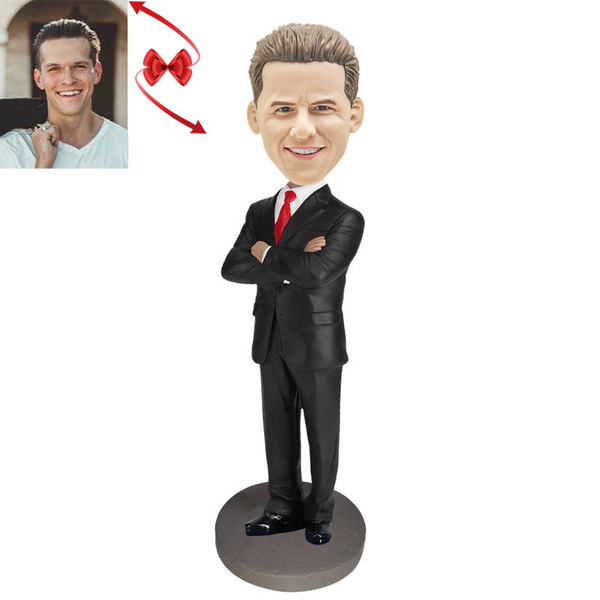
The spring is the heart of the Bobblehead mechanism and controls how the head moves. You can either buy a metal spring or 3Dprint a parametric spring specifically designed for Bobbleheads.[4][5][2]
Choosing a spring:
- Use a small compression spring with a diameter slightly smaller than the cavity.[3][2]
- For 3Dprinted springs, adjust coil count, diameter, and length for your Bobblehead scale.[8][5]
Basic design guidelines:
- The spring should be long enough for visible wobble but short enough to keep the Bobblehead head clear of the shoulders.[8][3]
- Thicker wire or stiffer plastic gives a firmer, faster Bobblehead bounce, while thinner material makes a looser wobble.[4][5]
Once the Bobblehead head, body, base, and spring (if 3Dprinted) are modeled, you must slice and print them. Proper orientation, infill, and supports affect strength and surface quality of your Bobblehead.[1][2]
Slicing for your 3D Bobblehead:
- Import STL or 3MF files of head, body, base, and spring into slicing software.[1][2]
- Select layer height, infill percentage, supports, and temperatures suitable for your chosen filament or resin.[2]
Printing tips:
- Print the Bobblehead head upright or slightly tilted to reduce support scars on the face.[1][2]
- Consider printing the Bobblehead body and base separately, then gluing them together for better quality.[2]
Postprocessing removes printing artifacts so your Bobblehead looks professional after painting. Sanding and surface treatment are especially important around the Bobblehead face and visible areas.[1][2]
Basic postprocessing steps:
- Carefully remove supports from the Bobblehead head and body with cutters or a hobby knife.[2]
- Sand with progressively finer grits to smooth visible surfaces and blend layer lines.[2]
Optional surface enhancement:
- Use filler primer or putty to fill small gaps or artifacts on the Bobblehead surface.[1]
- Lightly sand again to create an even base for paint and clear details on the Bobblehead head.[1]
Now you combine head, spring, and body to create the wobbling Bobblehead effect. Clean assembly and alignment help your 3D Bobblehead wobble freely without hitting the shoulders or base.[7][3][2]
Attaching the spring to the head:
- Apply a small amount of glue into the cavity inside the Bobblehead head.[7][3]
- Insert one end of the spring, press, and hold until fully bonded and centered.[7][3]
Attaching the spring to the body:
- Dryfit the head and spring above the Bobblehead body to check clearance and wobble.[3][2]
- Glue the other end of the spring into the body cavity, using shims or adjustments if the head tilts excessively.[2]
Painting turns a plain printed model into a vibrant, characterful Bobblehead. Use reference photos for skin tones, clothing details, and small features to keep your Bobblehead recognizable.[3][1]
Painting workflow:
- Apply a primer coat to the Bobblehead to help paint adhere.[1]
- Block in main colors for skin, hair, clothing, and base, then add shading and highlights.[1]
Detail and protection:
- Use fine brushes for facial features, logos, and text on the Bobblehead base.[3][1]
- Finish with a clear coat (matte, satin, or gloss) to protect the Bobblehead paint and unify the surface.[1]
Once you master basic 3D Bobblehead making, you can explore more advanced customization. These enhancements increase value for gifts, collections, and promotional Bobblehead projects.[8][1]
Creative variations:
- Fullcolor printed Bobblehead heads using color 3D printing services or multicolor printers.[3]
- Interchangeable Bobblehead heads using standardized spring and cavity sizes.[8]
Functional and thematic bases:
- Lightup bases or integrated logos for branded Bobblehead campaigns.[1]
- Themed props or miniscenes around the Bobblehead to match hobbies or professions.[1]
Making a 3D Bobblehead is a complete miniproduction process that includes concept design, 3D modeling, printing, mechanical assembly, and painting. By carefully designing the head, body, and spring system, then printing and finishing the parts with attention to detail, you can build a fully custom Bobblehead that captures a personality and delivers a satisfying wobble.[3][2][1]
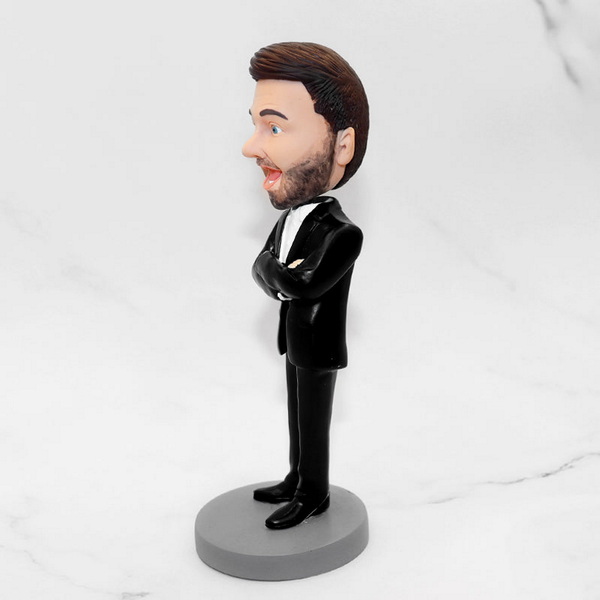
From start to finish, a typical first Bobblehead project may take one to several days, including design, printing, and painting time. Longer print times and drying times for paint and glue mean you should plan the Bobblehead schedule in stages rather than one continuous session.[3][2][1]
Yes, you can create a 3D Bobblehead using manual modeling tools like Tinkercad or Blender without any scanner. A scanner simply speeds up capturing facial structures for a realistic Bobblehead, but stylized designs work well when modeled by hand.[3][2][1]
Many makers use PLA or resin for 3D Bobblehead parts because they are easy to print and finish. Resin often provides smoother details for small Bobblehead faces, while PLA is more accessible and robust for larger Bobblehead bodies and bases.[2][1]
If the Bobblehead head hits the shoulders, shorten the spring, increase the neck clearance, or add shims to adjust tilt and height. Rechecking cavity sizes and spring length before final gluing helps the Bobblehead move freely without collision.[8][3][2]
Yes, many tutorials show how to print a new head and attach it to an existing Bobblehead body with a spring. This approach lets you update the Bobblehead character while keeping a sturdy premade body and base.[3][2]
[1](https://all3dp.com/2/3d-print-bobblehead-3d-printer-all-you-need-to-know/)
[2](https://www.instructables.com/3D-Printed-Bobblehead/)
[3](https://www.instructables.com/3D-Printing-your-own-full-color-bobblehead-using-1/)
[4](https://www.youtube.com/watch?v=DOGcpoSFUCw)
[5](https://www.printables.com/model/282561-parametric-bobblehead-springs)
[6](https://www.youtube.com/watch?v=H6k35Ujheuw)
[7](https://www.youtube.com/watch?v=b_FrrllTHqs)
[8](https://www.youtube.com/watch?v=mZKA3nQ9KCc)
[9](https://www.youtube.com/watch?v=ctRtwxuY7WA)
[10](https://www.facebook.com/groups/424805480329761/posts/783625864447719/)
[11](https://www.reddit.com/r/ChatGPT/comments/1jyq33m/i_made_a_bobble_head_of_myself_that_im_going_to/)
[12](https://www.youtube.com/watch?v=3HwXJQMGgsQ)
[13](https://www.teacherspayteachers.com/Product/3D-Print-Your-Own-Bobblehead-7369659)
[14](https://www.reddit.com/r/3Dprinting/comments/1nx14p5/sculpted_printed_and_painted_a_functional/)
[15](https://www.tiktok.com/@lukis3d/video/7401415207953632544)


